Professional Roblox obbies macro toolkit

ObbyistMacro

Four macros — Wallhop, Freeze, Align and Wall Walk — with global hotkeys and a global suspend key. Everything only fires while Roblox is focused.

Checking for the latest release…

4macros
100%hotkey driven
1small tray app
0config files to touch

Preview

The whole toolkit, one window.

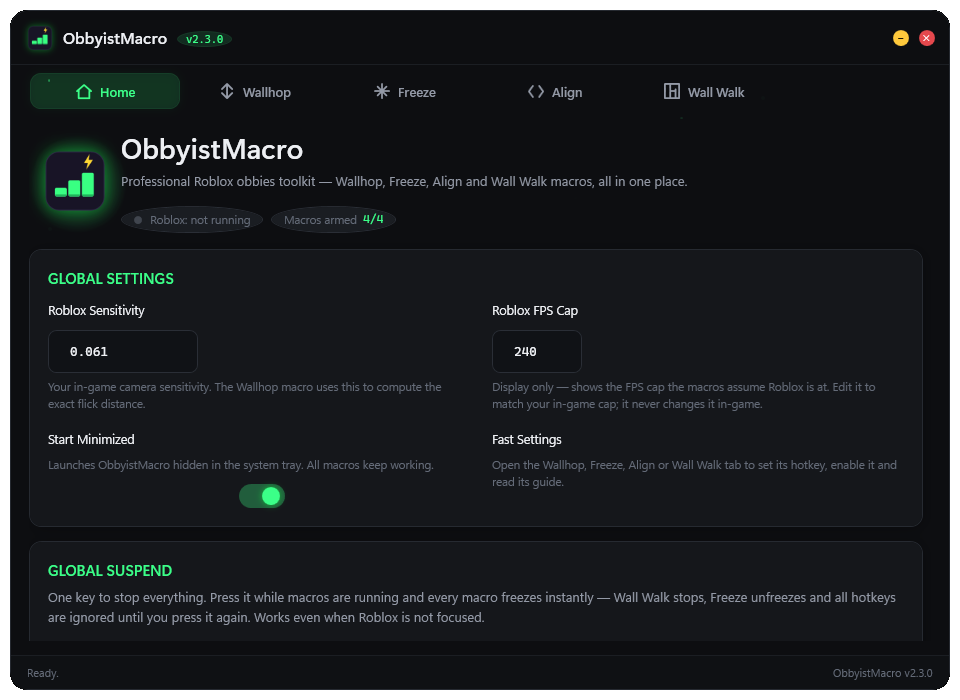
ObbyistMacro home tab with global settings, Roblox sensitivity and macro status

The toolkit

Four macros. One hotkey each.

Wallhop Macro

Flicks your camera and jumps right after — a clean wallhop every time, at any FPS cap. The flick distance is computed from your Roblox sensitivity, so it feels right on any setup.

  • Pixel-perfect flick from your sensitivity
  • Consistent at any FPS cap
  • One hotkey, zero spam

Freeze Macro

Freezes the entire Roblox process instantly (NtSuspendProcess) — the setup for glitches like the lag jump. Resumes just as fast.

  • Toggle mode — one key, on and off
  • Hold mode — frozen only while held
  • Works with keyboard or mouse hotkey

Align Macro

Auto-detects your keyboard's alignment keys (, and .) so you can rebind them yourself — very useful if your keyboard has ghosting.

  • Keys are resolved from your keyboard layout automatically
  • Separate hotkey for left and right alignment
  • Honors Shift / AltGr modifiers

Wall Walk Macro

Spams flicks several times a second so your character walks along a two-part wall. Flick size follows your sensitivity and the pacing your Roblox FPS setting — consistent on any setup.

  • Toggle or Hold mode
  • Walks along split (two-part) walls
  • Stops itself when Roblox loses focus

How it works

Set up once. Play forever.

1

Install & launch

Run ObbyistMacro-Setup.exe, pick your shortcuts and click Install. It goes to Program Files (x86), lives in your system tray and updates itself when a new version is out.

2

Set your Roblox sensitivity

Enter your in-game sensitivity once — the Wallhop and Wall Walk flicks are computed from it, so they land right on any setup.

3

Bind your hotkeys

Click a keybox and press the key (or mouse button) you want. Esc cancels.

4

Play Roblox

Global hooks watch for your hotkeys — and they only fire while Roblox is the focused window.

Get it

Download the latest release

Grab the newest build automatically — this page always points to the latest GitLab release.

Download for Windows

Checking for the latest release…

Free • Open source • Requires Windows 10+